
Bramble |
||
| 1 | ||
Sharing files |
||
| 1 | ||
Google Meet |
||
| 3 |
Option1: Use Google Meet to Present |
|
| 4 |
Option2: Use Google Meet to Present, the better option maybe... |
|
| 5 | ||
| 6 | Take over the screen during a meeting. | |
| 7 | Troubleshoot Google Meet connections | |
Miro |
||
| 1 | Using Miro. | |
| 2 | Short Video Tutorials: More on Miro. | |
Snip and Sketch |
||
| 1 | Using Snip and Sketch | |
Preparing for Coding |
||
| 1 | ||
| 2 | ||
| 3 | ||
Desmos |
||
| 1 | Introduction to using Desmos, Tips and Tricks | |
| 2 | Library of short (approx. 2 min) Desmos feature videos | |
How do I force a page to refresh? |
||
| Q | My web page is not picking up the latest changes, how do I force the website to refresh? | |
| A | First press F12 to get the development tools | |
| Spot the refresh icon next to the address bar | ||
 |
||
Press and hold
the icon for a couple of seconds, then select the "Hard Reload" entry in
the menu. This will force a full refresh of the website.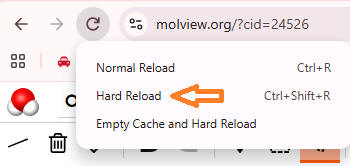 |
||